
Technology Assistance Center

Reactivate Duo Mobile App on New Phone/After Phone Reset.

If you get a new phone or reset your phone, you will need to reactivate the Duo Mobile app. Follow the steps below.

Step 1

Go to the Duo Enrollment Page and log in with your NetID and password.

Step 2

On the Duo prompt page, click the Settings button and then My Settings & Devices.
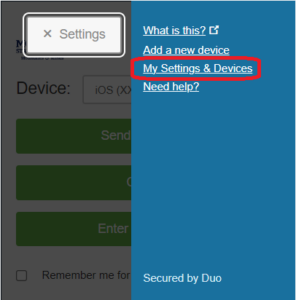
Duo enrollment page showing clicking the settings button and then my settings & devices.

Step 3

Verify your identity. Since we’re reactivating Duo Mobile, Duo Push will not work. Instead, choose either Call Me or Enter a Passcode (which will send you a code via text message).
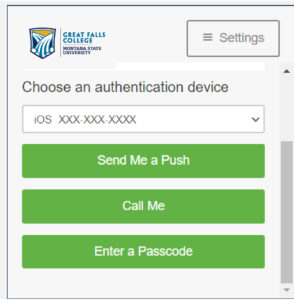
Duo enrollment screen showing choose an authentication device, a drop down menu showing iOS XXX-XXX-XXXX, and three buttons, Send me a push, call me, and enter a passcode.

Step 4

Click the Gear button next to the phone you are reactivating.
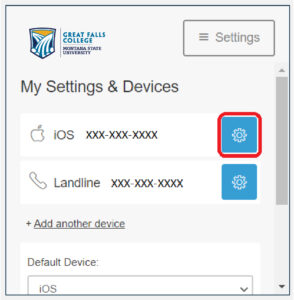
Duo enrollment screen showing my settings & devices with a section that says iOS XXX-XXX-XXXX and a button with a gear icon, and one that says Landline XXX-XXX-XXXX.

Step 5

Click the Reactivate Duo Mobile button.
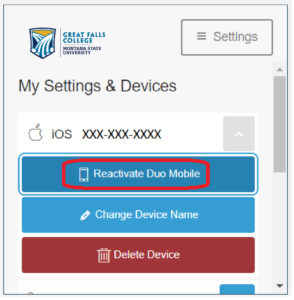
Duo enrollment screen that says my settings & devices with an option that says iOS XXX-XXX-XXXX and then buttons that say reactivate duo mobile, change device name, and delete device. The reactivate duo mobile button is highlighted.

Step 6

Select your phone’s operating system, then click Continue.
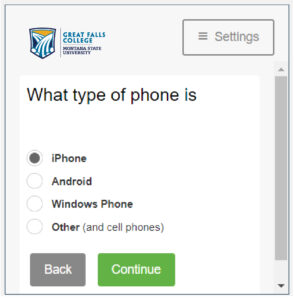
Duo enrollment screen that says what type of phone is and options of iphone, android, windows phone, and other.

Step 7

Install the Duo Mobile app on your device if you have not already done so, then click the I have Duo Mobile.
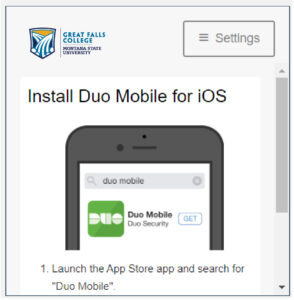
Duo enrollment screen that says install duo mobile for iOS with a picture of an iphone and then 1. launch the app store app and search for "duo mobile".

Step 8

On your phone, open the Duo Mobile app. Click the “+” icon on the top of the screen. Hold your phone up to the computer and scan the on-screen barcode using the Duo Mobile application’s built-in scanner. After you have scanned the barcode, click Continue.
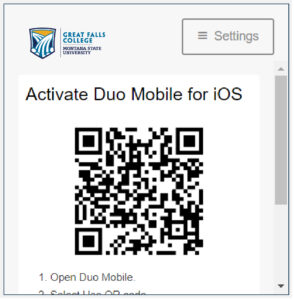
Duo enrollment screen that says activate duo mobile for iOS, a QR code, and then 1. open Duo mobile.